
Multi-Screen Display Solutions for LED Panels: Hardware vs. Software Explained

Why Do LED Display Projects Need Multi-Screen Solutions?
In many LED display projects, a single full-screen image is no longer enough. Conference rooms often need to show presentation slides, speaker cameras, and remote participants at the same time. Control rooms may need to display surveillance feeds, maps, dashboards, and alert windows on one LED video wall. Retail stores and showrooms may want to combine product videos, promotional messages, and brand visuals in a more dynamic layout. Stage screens may require layered backgrounds, split-screen content, or picture-in-picture effects during live production.
As these applications become more common, multi-screen display solutions for LED panels have become an important part of LED system design. In practical terms, this means dividing one LED display into multiple visual regions or combining several content sources into one organized layout. Common formats include split-screen, picture-in-picture (PiP), picture-by-picture, and multi-window display.
However, not all multi-screen solutions work the same way. Some projects use a hardware video processor with dedicated chips for real-time signal handling. Others rely on a software-based multi-screen solution running on a PC, where the layout is created by software and output through a graphics system. Both approaches can achieve similar display effects on the screen, but they differ significantly in latency, stability, operational risk, and long-term reliability.
This difference matters in real projects. A conference room LED display may require fast switching and stable daily use. A control center may depend on continuous 24/7 operation and multiple live inputs. A retail screen may only need scheduled playback and flexible layout editing. The same visual result can be achieved in different ways, but the underlying architecture determines whether the system is suitable for the application.
For LED display integrators, procurement teams, consultants, and project engineers, choosing between hardware and software is not just a technical detail. It affects signal flow, user experience, maintenance workload, and system reliability. It also influences how the solution works with the broader LED control system, including the video processor, sending card, receiving card, control software, and signal transmission chain.
This article explains what multi-screen display solutions are, how hardware and software approaches work, where they are commonly used, what advantages and limitations they have, and how to choose the right option for a specific LED project.

What Is a Multi-Screen Display Solution for LED Panels?
A multi-screen display solution for LED panels is a method of showing multiple content sources or multiple content regions on a single LED screen at the same time. Instead of displaying one full-screen signal only, the system can divide the screen into separate windows, layer one image over another, or create customized layouts for different types of content.
These layouts are commonly used for:
Split-screen display
Picture-in-picture (PiP)
Multi-window display
Presentation plus video conferencing
Surveillance plus dashboard visualization
Advertising plus product information
Live camera plus background content
From a functional perspective, a multi-screen solution is not the LED display itself. It is part of the image processing and signal management layer that prepares content before it reaches the screen. In a typical LED project, the display chain may include:
Content Source → Multi-Screen Processing → Video Processor / LED Control System → Sending Card → Signal Transmission → Receiving Card → LED Screen
This means the multi-screen function works within the wider LED control system. It affects how content is arranged, how signals are switched, and how the final visual output is delivered to the LED cabinets. In many projects, the processing stage is handled either by a hardware video processor or by software-based control software running on a PC.
Understanding this functional position is important because it shows that multi-screen display is not just a visual feature. It is also a system design decision that affects latency, reliability, screen compatibility, and operating workflow.
What Is the Difference Between Hardware and Software Multi-Screen Display Solutions?
The difference between hardware and software multi-screen display solutions is mainly about how the image is processed and where the system depends for stability.
A hardware video processor uses dedicated internal chips to receive multiple inputs, process them in real time, and output the final layout to the LED display. It works as a purpose-built device for signal switching, image scaling, screen composition, and output control. This makes it more suitable for applications where latency and reliability are critical.
A software-based multi-screen solution uses a PC or workstation to receive content sources, arrange them through software, and output the final composed image to the LED screen. It relies on the computer’s CPU, GPU, operating system, and software environment. This makes it more flexible and often more affordable, but also more dependent on computer performance and software stability.
In short:
Hardware is usually stronger in latency, reliability, and professional input handling.
Software is usually stronger in cost flexibility, layout creativity, and easier scene editing.
The right choice depends on the project’s operating conditions, screen configuration, signal complexity, and risk tolerance.
How Does a Hardware Video Processor Work for LED Multi-Screen Display?
A hardware video processor is a dedicated device designed to process and manage video signals for LED screens in real time. In a multi-screen setup, it receives multiple input sources such as laptops, cameras, media players, set-top boxes, or broadcast feeds through interfaces like HDMI, DVI, SDI, VGA, or DisplayPort.
Inside the processor, dedicated chips handle tasks such as:
Signal decoding
Image scaling
Cropping
Layering
Source switching
Picture-in-picture composition
Multi-window arrangement
Output resolution control
Once the desired layout is created, the processor sends the output signal into the LED display chain. Depending on the system design, this may connect directly or through other components in the LED control system, including the sending card, signal transmission network, and receiving card.
A typical hardware-based path may look like this:
Input Sources → Hardware Video Processor → LED Control System / Sending Card → Signal Transmission → Receiving Card → LED Panel

Because the device is purpose-built for signal handling, it typically delivers:
Very low latency
Stable switching performance
Better support for continuous operation
Strong compatibility with professional AV sources
Better handling of irregular or large LED screen layouts
This is why hardware processors are commonly used in conference rooms, control centers, live events, studios, government spaces, and other applications where display reliability is important.
How Does a Software-Based Multi-Screen Solution Work?
A software-based multi-screen solution uses a computer as the main platform for arranging and outputting multiple content sources. In this setup, the user works through a software interface to position windows, assign sources, create layers, and configure the final on-screen composition.
All source signals must first pass through the computer environment. Depending on the signal type, this may require capture cards, converters, or streaming inputs. The software then combines these elements using the PC’s CPU and GPU, and the finished visual output is sent to the LED screen through the graphics card and the broader LED display chain.
A typical software-based signal path may look like this:
Input Sources → PC / Control Software → Graphics Output → LED Control System → Sending Card → Signal Transmission → Receiving Card → LED Panel
This model offers flexibility in scene creation and content updates. Many software platforms allow operators to:
Create custom layouts
Add animation or transitions
Resize and move windows
Update content quickly
Manage scheduled playback
Switch between preset scenes
However, the system’s performance depends heavily on:
CPU and GPU capacity
Operating system stability
Driver compatibility
Input capture reliability
Software optimization
Background process load
For playback-based and lower-risk applications, this may be fully acceptable. For live and mission-critical applications, these dependencies can become a limitation.
What Types of Multi-Screen Display Solutions Are Available?
In most LED projects, multi-screen display solutions fall into two main categories.
1. Hardware Video Processors
These are dedicated processing devices built for real-time LED and AV signal management. They are commonly used where stability, low latency, and direct multi-source input handling are important. Hardware video processors are often integrated with the broader LED control architecture and can work closely with control software, sending cards, and receiving cards.
Typical use cases include:
Conference rooms
Command centers
Monitoring rooms
Broadcast studios
Sports venues
Government meeting halls
Creative or irregular LED screens
2. Software-Based Multi-Screen Systems
These solutions use PC-based software to compose and output multiple windows or layered content for LED displays. They are typically chosen where layout flexibility, cost control, and content editing convenience are more important than real-time responsiveness.
Typical use cases include:
Retail digital signage
Showrooms
Promotional LED displays
Pre-recorded media playback
Small event screens
Branded visual installations
Some projects may use both approaches in a hybrid workflow, but the core buying decision is usually still between a hardware-based architecture and a software-based architecture.
Where Are Multi-Screen Display Solutions Commonly Used?
Multi-screen display solutions are used across a wide range of LED applications because they allow more information and more visual control to be presented on a single display surface.
Conference Rooms
Conference rooms often need to show presentations, video conference participants, corporate branding, and live data at the same time. Stability and fast source switching are important, so hardware video processors are often preferred.
Control Rooms and Monitoring Centers
These environments require multiple live feeds, maps, dashboards, and alert windows on one large LED wall. Because the application is typically real-time and operationally critical, hardware processing is usually the safer choice.
Broadcast Studios and Live Events
Live production requires accurate timing, low latency, and dependable source switching. Hardware processors are commonly used because even small delays can affect production quality.
Retail Digital Signage
Retail environments often use multiple windows for branding, promotions, and product visuals. Since the content is frequently pre-recorded and not latency-sensitive, software-based solutions can be a practical option.
Showrooms and Corporate Experience Centers
Brand spaces may use multi-window layouts to combine storytelling content, product information, and visual effects. Either hardware or software may be used depending on whether the display is interactive, live, or playback-focused.
Stage Background Screens
For large or high-pressure stage applications, hardware is usually preferred. For small-scale stage backdrops or controlled playback scenarios, software may be acceptable.
Special-Shaped LED Screens
Curved, vertical, corner, or irregular LED screens often require more advanced scaling and mapping support. Hardware processors generally provide stronger support for these requirements.
What Are the Main Advantages of Hardware Video Processors?
A hardware video processor offers several practical advantages in professional LED projects.
Ultra-Low Latency
Dedicated chips can process signals much faster than a software-only system. This is especially useful in live events, conference presentations, camera switching, and monitoring applications.
Higher Stability
Hardware devices operate independently of a PC operating system. This reduces the risk of crashes, background conflicts, software interruptions, and malware-related problems.
Better Real-Time Switching
When multiple live inputs need to switch smoothly and reliably, hardware processors generally perform more consistently.
Rich Input and Output Compatibility
Most processors support multiple signal types directly, which simplifies connection with different source devices.
Continuous Operation Capability
Professional processors are designed for long operating hours and can be suitable for daily or 24/7 use depending on the application.
Better Support for Irregular LED Screens
Creative LED layouts often require stronger mapping, scaling, and output management than a standard PC workflow can provide.
Easier Integration into LED Control Systems
Hardware processors are often designed to work smoothly with the broader LED control system, including sending card, receiving card, and dedicated control software environments.
What Are the Main Advantages of Software-Based Multi-Screen Solutions?
Software-based systems are also valuable in the right project context.
Lower Initial Cost
A PC-based structure can reduce the need for dedicated processing hardware, which may lower initial project cost.
More Flexible Layout Editing
Operators can often adjust windows, scenes, and visual effects more quickly in a software interface.
Easier Content Updates
Marketing or content teams may find software systems easier to update, especially for scheduled campaigns and playback content.
Suitable for Playback-Oriented Use Cases
When the project focuses on pre-recorded video, promotional content, or low-risk visual layouts, software can be fully sufficient.
Accessible for Smaller Projects
For installations with simpler requirements, software can offer a practical and cost-conscious starting point.
What Are the Limitations of Hardware and Software Solutions?
Both approaches have limitations, and these should be matched to project requirements.
Hardware Video Processor Limitations
Higher upfront cost
More fixed hardware capability compared with flexible software environments
Advanced configuration may require professional setup knowledge
Software-Based Solution Limitations
Higher latency
Greater dependence on CPU, GPU, and OS stability
More risk from software crashes, updates, driver issues, or background processes
Less suitable for critical live switching applications
May require converters, capture cards, or additional setup for multiple external inputs
In practice, the limitations matter most when the application is demanding. In lower-risk environments, software limitations may be acceptable. In real-time or mission-critical environments, they often are not.
Which Solution Is Better for Different LED Applications?
The answer depends on the project type, not just on the feature list. The table below provides a simplified comparison.
Application | Hardware Video Processor | Software-Based Solution |
Conference rooms | Recommended | Limited suitability |
Live streaming and sports events | Recommended | Usually not preferred |
Retail digital signage | Optional | Recommended |
Pre-recorded content playback | Optional | Recommended |
Stage background screens | Recommended for larger projects | Suitable for smaller playback-based projects |
Multi-signal control centers | Recommended | Usually not preferred |
Creative or irregular LED screens | Recommended | Limited suitability |
This comparison does not mean software cannot be used outside retail or playback scenarios. It means hardware is generally the more reliable choice where operational pressure is higher.
How to Choose the Right Multi-Screen Display Solution for LED Panels?
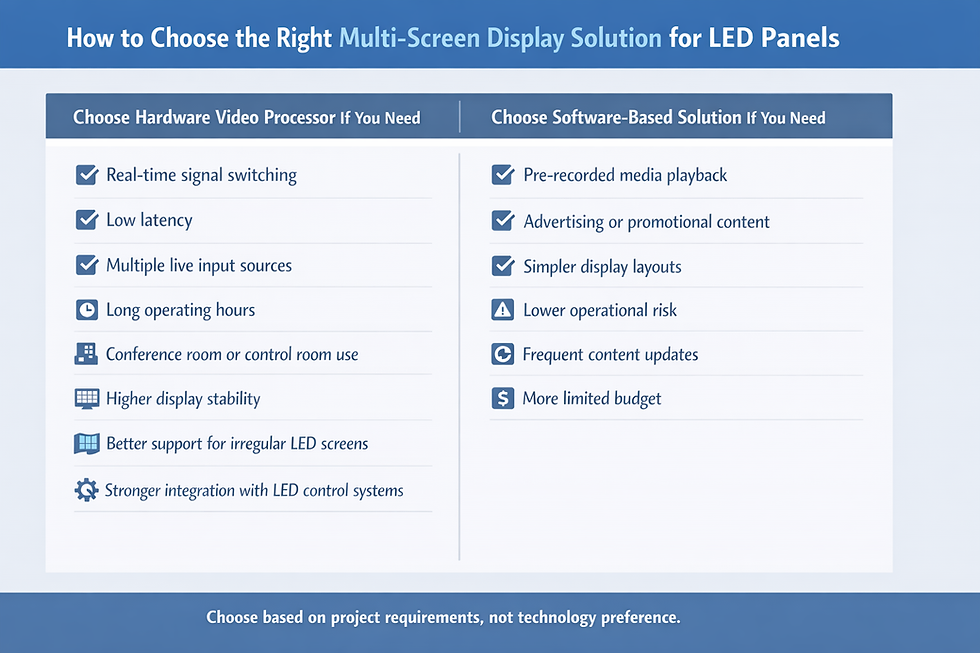
Choosing the right solution starts with the application requirements, not the technology preference. A useful selection process should consider both technical performance and operational reality.
Choose a hardware video processor if your project requires:
Real-time signal switching
Low latency
Multiple live input sources
Long operating hours
Professional conference or control room use
More reliable display stability
Better compatibility with special-shaped LED screens
Stronger integration with a professional LED control system
Choose a software-based multi-screen solution if your project involves:
Pre-recorded media playback
Advertising or promotional content
Simpler display layouts
Lower operational risk
Frequent scene or content changes
More limited budget
Before making a final decision, buyers and engineers should consider these practical questions:
How many simultaneous input sources are required?
Are those sources live or playback-based?
Is low latency critical to the application?
Will the system run for long daily hours?
Does the screen have a standard or irregular shape?
Who will operate the system after installation?
Is the environment mission-critical or presentation-oriented?
Is future expansion likely?
For B2B buyers, it is also important to think beyond purchase price. A lower-cost solution may create higher operating risk, more maintenance intervention, or more performance limitations over time. In many professional LED projects, reliability and supportability are as important as initial hardware cost.
Which Brands Are Common in the Market?
Several brands are commonly used in LED multi-screen projects, although the right choice depends on screen type, signal requirements, compatibility, local support, and project complexity.
Common Hardware Brands
NovaStar
Colorlight
Mooncell
Linsn
These brands are often associated with video processors, LED control systems, sending cards, receiving cards, and related control software.
Common Software Platforms
Resolume
LED Studio
vMix
Different software platforms focus on different strengths. Some are better for content playback and layout creation, while others are better suited for live production workflows.
When comparing brands, buyers should evaluate:
Input and output interface support
Compatibility with the existing LED control system
Sending card and receiving card ecosystem
Ease of use of the control software
Signal transmission requirements
Local service, support, and documentation
Frequently Asked Questions About Multi-Screen Display on LED Panels
1.Can one LED screen show multiple content sources at the same time?
Yes. This can be achieved using either a hardware video processor or a software-based multi-screen solution, depending on the project’s performance and stability requirements.
2.Which solution has lower latency?
A hardware video processor usually provides lower latency because it uses dedicated processing chips instead of relying on a PC operating system and software workflow.
3.Is software suitable for live events?
It may be acceptable for small and controlled playback scenarios, but hardware is generally preferred for live events because of better stability and faster switching.
4.Do special-shaped LED screens require hardware processing?
In many cases, yes. Curved, vertical, corner, or irregular LED screens often benefit from the stronger mapping and output control functions of hardware processors.
5.How does a multi-screen solution relate to sending cards and receiving cards?
The multi-screen processing stage usually happens before the signal reaches the sending card and receiving card chain. This means the quality of the processor or software output directly affects final display performance.

Conclusion
Multi-screen display solutions for LED panels are no longer just an optional feature. In many conference, retail, control room, broadcast, and stage projects, they are a core part of how information is presented and managed on the screen.
Both hardware and software approaches can support split-screen, picture-in-picture, and multi-window display, but they are not equally suitable for every environment. A hardware video processor is generally more appropriate for projects that demand low latency, stable switching, continuous operation, and stronger compatibility with professional LED systems. A software-based multi-screen solution is often more suitable for playback-oriented, budget-conscious, and lower-risk applications where layout flexibility is a priority.
For LED display integrators, project planners, and procurement teams, the best approach is to evaluate the real application conditions first. By matching the processing method to the actual operating environment, it becomes easier to build an LED display system that is practical, stable, and easier to maintain over time.


Comments