
Complete Guide to Conference Room LED Display Systems: Sizing, Selection & Budget Planning

Meta Description: Expert guide to conference room LED displays. Learn how to select pixel pitch, size systems correctly, specify equipment, and budget accurately for installations.
Many facility managers approach LED display projects by immediately asking: "What pixel pitch do we need?" or "How much per square meter?" Starting with these questions often leads to costly mistakes and budget overruns of 30-50%.
Successful conference room LED display installations require systematic planning: analyze spatial requirements first, specify complete equipment packages second, and allocate realistic budgets third. This guide walks through the entire process, helping procurement teams and IT professionals avoid common pitfalls that turn attractive initial quotes into expensive surprises during installation.
A complete system encompasses far more than display panels. It includes video processors, control systems, structural mounting, power distribution, and integration components. Understanding these interconnected elements before procurement prevents the scenario where "additional requirements" discovered during installation blow through budgets.
1. What Is a Conference Room LED Display System?
A conference room LED display system integrates LED panels, video processing equipment, control systems, mounting structures, and power distribution into a unified visual communication solution for professional meeting environments. Unlike consumer displays or projectors, these systems prioritize seamless multi-source content management and operational reliability for business-critical applications.
The fundamental architecture consists of three integrated layers:
Display layer: Modular LED cabinets containing LED modules, receiving cards, and power supplies connect to form the complete screen. Cabinet construction and pixel pitch determine image quality and viewing characteristics.
Control layer: Sending cards receive input signals, video processors manage multiple content sources (laptops, video conferencing, wireless sharing), and receiving cards embedded in cabinets decode signals to drive LED modules. This architecture enables seamless switching between presentation sources during meetings.
Infrastructure layer: Mounting systems (wall brackets or frames), power distribution with circuit protection, signal cabling networks, and integration with room control systems. Professional installations incorporate redundancy in critical paths to ensure meeting continuity during component failures.
Conference room LED displays differ fundamentally from LCD walls and projectors in several key aspects: superior brightness (600-1200 nits) maintains visibility under ambient lighting without room darkening, modular construction enables custom dimensions and aspect ratios fitting architectural spaces precisely, and zero-gap seams create unified images without bezels interrupting content. However, these advantages require higher initial investment, making proper specification essential for cost-effective deployment.
2. How Do These Systems Function in Meeting Environments?
2.1 Primary Role
The system consolidates multiple presentation sources into a single large-format display visible to all participants simultaneously. Common sources include local computer connections (HDMI, DisplayPort), wireless presentation systems, video conferencing endpoints, and networked content management systems.
Meetings require seamless source switching—presentations transition from laptop slides to video conferences showing remote participants, incorporate wireless screen sharing from attendees, and display real-time business intelligence data, all within minutes. This workflow flexibility distinguishes conference room systems from single-purpose displays.
2.2 Integration Requirements
Systems integrate within broader AV and unified communications ecosystems. Typical integration points include video conferencing platforms (Zoom Rooms, Microsoft Teams, Cisco Webex) requiring specific resolution and aspect ratio support, room scheduling systems displaying calendar information, and building management systems for power scheduling and monitoring.
Control system integration enables centralized management where facility teams monitor display health, push content updates, adjust brightness, and receive maintenance alerts across multiple conference rooms. This operational visibility is essential for organizations managing dozens or hundreds of meeting spaces.
2.3 Signal Flow
Source devices output video signals that first reach the video processor, which performs format conversion, source switching, and often scaling/windowing for multiple simultaneous sources. The processor outputs to the sending card, which converts processed video into LED control protocols.
Sending cards connect to receiving cards (one or more per cabinet) via high-speed data networks—typically Gigabit Ethernet or fiber optic for larger installations. Receiving cards decode control data and generate precise timing signals driving individual LED modules.
System performance depends on every component. High-quality displays with inadequate processing produce mediocre results, just as excellent processors cannot overcome low-quality panels. Proper design requires balanced specification across all components.
3. What Types and Specifications Are Available?
3.1 Pixel Pitch Categories
Pixel pitch—center-to-center distance between adjacent pixels in millimeters—fundamentally determines viewing experience and cost.
P0.9–P1.2 (Ultra-fine): Executive boardrooms where viewers sit 2-3 meters from displays. Extremely detailed image reproduction comparable to high-end LCDs but at 50-80% premium pricing. Common in corporate headquarters and financial environments where quality justifies investment.
P1.5–P1.8 (Fine pitch): Mainstream conference room specification balancing excellent image quality with accessible pricing. Appropriate for 3-5 meter viewing distances covering most standard conference configurations. Best value proposition for typical business applications.
P2.0–P2.5 (Standard fine pitch): Large conference rooms, training centers, and multi-purpose spaces with 4-5+ meter viewing distances. Less expensive but visible pixel structure at close distances makes these unsuitable for boardrooms requiring detailed content inspection.
Selection principle: Choose pixel pitch based on actual viewing distance, not budget alone. P2.5 in small boardrooms produces disappointing results regardless of other quality. P1.2 in large training rooms wastes budget on imperceptible resolution advantages.
3.2 Encapsulation Technology
SMD (Surface Mount Device): Dominant technology mounting red, green, blue LED chips within single surface-mount packages on PCBs. Mature technology offers excellent cost-performance, established supply chains, and straightforward serviceability. Limitations appear in very fine pitch applications (below P1.0) and potential reliability challenges from exposed package structure.
COB (Chip-on-Board): Emerging technology mounting LED chips directly on PCBs with protective coating. Advantages include superior impact/dust protection, elimination of individual package failures (most common SMD failure mode), better color uniformity, and reduced light reflection for comfortable extended viewing.
COB displays command 30-50% premium but offer lower total ownership cost through reduced failures and maintenance. Organizations with high utilization (40+ hours weekly), physical contact/dust exposure potential, or reliability-critical applications often justify COB investment.
3.3 Cabinet Design
Standard cabinets typically measure 500×500mm or 500×1000mm with front-access serviceability, integrated receiving cards/power supplies, and quick-lock assembly mechanisms. These work for most applications, balancing cost, reliability, and maintenance accessibility.
Front-service vs. rear-service: Front-service enables maintenance from within meeting rooms without wall penetration—essential when displays mount against structural walls or where rear access is impractical. Rear-service requires access space behind displays but offers slightly lower cost and thinner depth.
Cabinet construction quality varies substantially. Premium cabinets use precision aluminum extrusion ensuring flatness, high-grade module mounting preventing distortion, and robust connections maintaining alignment through thermal cycling. Economy cabinets may compromise long-term flatness and uniformity.
3.4 Control Platforms
Novastar systems: Market leader with extensive product range. MCTRL series sending cards support 4K input with downscaling, multiple sources with seamless switching, and Ethernet control. MRV receiving cards handle cabinet-level driving optimized for different pitches and refresh rates. Excellent software support and third-party integration.
Colorlight systems: Strong presence in cost-sensitive applications offering comparable functionality at lower price points. X/Z series sending cards with 5A receiving cards provide solid performance for standard requirements with somewhat less extensive features than premium Novastar products.
Linsn systems: Well-established platform with reliability reputation. TS/RV series cards integrate well with Crestron, AMX, Extron control systems, making them popular for enterprise deployments where control compatibility is essential.
Proprietary systems: Some manufacturers offer proprietary control platforms. While potentially offering integration advantages, proprietary systems create vendor lock-in limiting future expansion. Unless compelling technical advantages exist, standard platforms generally provide better long-term value.
4. What Are Typical Applications?
4.1 Corporate Boardrooms
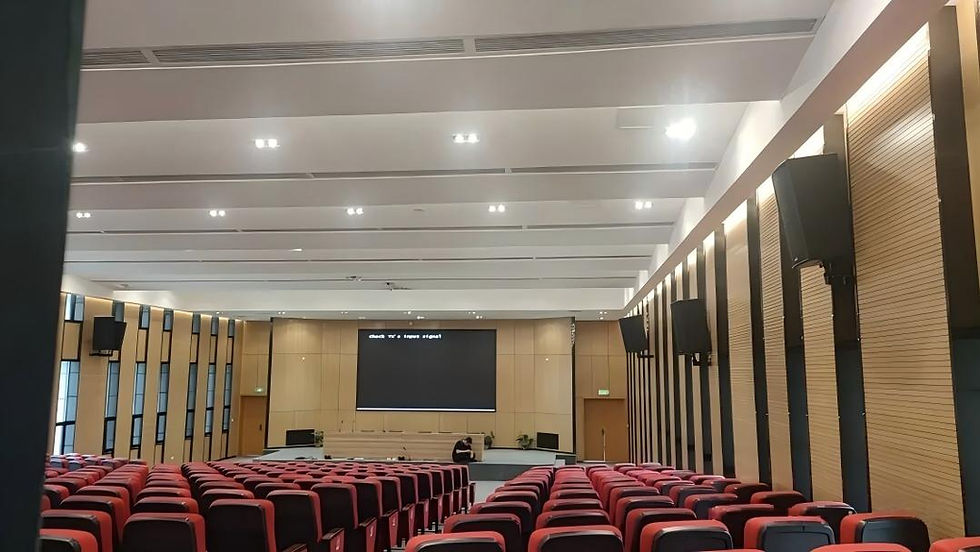
Executive environments prioritize image quality, reliability, and aesthetics. Specifications typically use P1.2–P1.8 pitch supporting detailed financial presentations, video conferencing with clear facial expressions, and comprehensive data visualization. Displays range 3–6 meters diagonal (4–18 square meters) in 16:9 aspect ratio.
Integration requires seamless video conferencing with dual-display modes (local content + remote participants), wireless presentation from personal devices, and one-touch control for non-technical users. Reliability is paramount since disruptions directly impact senior leadership productivity.
4.2 Standard Conference Rooms
Rooms serving 8–20 participants represent highest volume applications. P1.5–P2.0 pitch balances quality and budget, with 2–4 meter diagonal displays (3–10 square meters) scaling to room dimensions.
Requirements emphasize practical presentation: reliable laptop connectivity, wireless screen sharing, unified communications integration (Zoom, Teams, Webex), and straightforward operation without technical support.
Budget consciousness makes total ownership cost critical. Specifications should prioritize reliable operation over ultimate quality, favor standard platforms over proprietary systems, and incorporate adequate but not excessive features avoiding costly unused capabilities.
4.3 Training Centers
Training environments require larger displays (4–8 meters diagonal, 10–30 square meters) serving 20–100 participants. P2.0–P2.5 pitch suits greater viewing distances while controlling budget on larger dimensions.
Requirements differ from standard rooms: displays must be large enough for rear-row visibility, high brightness (800–1000 nits) maintains visibility with full room lighting for note-taking, and robust thermal management supports long continuous operation (8+ hours daily).
Multi-purpose functionality may require positioning adjustments, content zone management for simultaneous sources, and room scheduling integration.
4.4 Command Centers
Command centers and control rooms demand ultra-reliable 24/7 operation, diverse source support (security cameras, process monitoring, data visualization), and often video wall configurations forming unified environments.
Specifications emphasize redundancy (dual sending cards with failover, redundant power) over cost, proven platforms over cutting-edge features, and comprehensive monitoring enabling proactive maintenance.
5. What Are Key Advantages?
5.1 Superior Image Quality
Brightness uniformity across entire surfaces eliminates edge falloff common with projectors. High brightness (600-1200 nits) maintains visibility under ambient lighting without room darkening, enabling normal lighting for note-taking and video conferencing.
Contrast ratios exceed projection systems, particularly with ambient light. LEDs produce true zero-emission blacks while simultaneously delivering bright whites, creating high-contrast images clearly communicating complex content.
5.2 Seamless Large Format
Modular construction creates truly seamless displays without LCD video wall bezels. Proper installation makes cabinet gaps imperceptible at viewing distances, creating unified images without visual interruption—valuable for data visualizations, maps, architectural renderings, or any content where bezels disrupt information flow.
Custom aspect ratios and dimensions precisely match available wall space, eliminating black bars or stretched images.
5.3 Long Operational Life
LED displays rate 100,000 hours to 50% brightness (L50). With typical conference room usage (8 hours daily, 250 days yearly = 2,000 hours annually), this translates to 50 years before reaching 50% brightness—effectively lifetime durability.
Modular construction enables component replacement (modules, receiving cards, power supplies) without entire system replacement, minimizing repair costs and downtime. This creates favorable total ownership cost despite higher initial capital versus projectors requiring lamp replacement or LCDs with limited operational lives.
5.4 Flexible Integration
Control systems support diverse input formats (HDMI, DisplayPort, SDI, IP streaming), enable seamless source switching, and integrate with Crestron, AMX, Extron platforms common in corporate environments.
Integration enables automatic display power-up with room scheduling, source switching triggered by control panels, and remote health monitoring by facility teams—functioning as components within broader unified communications ecosystems.
6. What Are Limitations?

6.1 Higher Initial Costs
Complete professional installations cost approximately $3,000-$5,000 per square meter including all equipment, mounting, infrastructure, integration, and commissioning. A 10 square meter system represents $30,000-$50,000 investment—40-60% more than large-format LCDs or projectors.
This requires justification through total ownership analysis, operational advantages, or specific technical requirements alternatives cannot satisfy. Budget planning must account for likely feature expansion—wireless presentation, advanced processing, unified communications integration, or additional room deployments.
6.2 Installation Complexity
Structural loading: Displays weigh 30–50 kg/m² fully equipped. A 10 square meter display = 300–500 kg total load requiring verified support capacity. Lightweight partition walls need substantial reinforcement often underestimated in initial budgets.
Precision alignment: Fine-pitch displays demand precise cabinet alignment maintaining uniform pixel planes. Professional installation with proper equipment is essential—amateur installation virtually guarantees unsatisfactory visible misalignment.
Service access: Front-service displays need clearance within rooms for technician access. Rear-service displays require permanent behind-display space (typically 800–1000mm). Inadequate access planning increases service costs and downtime.
6.3 Power and Cooling
Typical 10 square meter P2.0 displays draw 3–5 kW at maximum brightness, requiring dedicated circuits with appropriate capacity. While displays rarely operate at absolute maximum (60-80% typical), infrastructure must accommodate full rated power.
Heat dissipation proportional to power consumption may require supplemental cooling in rooms with marginal HVAC capacity, particularly for installations exceeding 10 square meters.
6.4 Content Resolution Challenges
LED display native resolution may not match standard video formats, creating scaling challenges. Example: 4m × 2.25m display at P1.5 = 2688×1512 pixels (non-standard resolution) requiring scaling from typical 1920×1080 or 3840×2160 sources.
Video processors handle scaling, but quality varies substantially. Economy processors introduce artifacts, reduce sharpness, or create latency. Professional processors deliver excellent performance but add $2,000-$8,000—expense sometimes underestimated in budgeting.
7. How to Select Systems: Specification Guide
7.1 Size and Pitch Selection
Step 1 - Measure viewing distance: Distance from display to farthest viewer requiring clear content visibility (design for worst case, not average).
Step 2 - Calculate minimum height: Display height ≈ maximum viewing distance ÷ 6 to 8. Example: 8m distance ÷ 6 = 1.33m minimum height. Use ÷6 for detailed content, ÷8 for simple content.
Step 3 - Determine width: Use 16:9 aspect ratio matching standard video content. If height = 1.5m, width = 1.5 × 16/9 = 2.67m (total 4 square meters).
Step 4 - Select pixel pitch: Minimum comfortable viewing distance (meters) = pixel pitch (mm). Examples:
P1.2: Comfortable from 1.2m minimum
P1.5: Comfortable from 1.5m
P2.0: Comfortable from 2.0m
If closest viewers sit 2.5m from display, P2.0 or finer provides smooth images.
7.2 Complete System Specification
Display components:
LED cabinets with specified pitch, dimensions, area
Brightness specification (minimum 600 nits)
Refresh rate (minimum 1920 Hz eliminating video flicker)
Encapsulation technology (SMD or COB)
Control components:
Video processor with sufficient inputs
Sending card(s) compatible with display resolution
Receiving cards (integrated or separate)
Control software licenses and programming
Mounting and infrastructure:
Mounting structure with specified load capacity
Installation labor (mounting, assembly, alignment)
Power distribution (dedicated circuits, cable, protection)
Signal cabling (HDMI, fiber, or network)
Integration components (as required):
Wireless presentation system
Cable plates at presentation locations
Room control system integration
Video conferencing integration
Services:
Design and engineering drawings
Installation supervision and commissioning
Calibration and color correction
Staff training
Warranty terms (display, components, labor)
Support and maintenance options
7.3 Control System Evaluation
Input format support: Verify processor supports all required input types and resolutions. Corporate environments typically need HDMI (laptops), DisplayPort (high-res computers), and increasingly IP streaming (network sources).
Switching capability: Seamless switching enabling instantaneous source transition without black screens is essential. Budget processors requiring 1-2 seconds are unacceptable in professional environments.
Control integration: If using Crestron, AMX, Extron control systems, verify LED platform provides documented integration protocols (typically TCP/IP or RS-232 commands). Avoid proprietary closed protocols unless manufacturer provides direct integration modules.
Scalability: Consider future expansion. If deploying displays in additional rooms, unified control platforms enable centralized management and support efficiency.
7.4 Installation Assessment
Structural evaluation: Engage structural engineer to verify wall loading capacity for displays exceeding 5 square meters. Lightweight framing/drywall walls require substantial reinforcement. Document required reinforcement and incorporate costs.
Electrical infrastructure: Verify electrical panels have adequate spare capacity for display power plus growth margin (recommend 150% of rated display power). Determine circuit routing and budget for electrical installation if new circuits required.
Service access: Identify technician access method. Front-service needs ~1m clearance within room. Rear-service needs minimum 800mm permanent clearance behind display. If neither practical, consider displays with both options (at premium cost).
Environmental factors: Assess HVAC capacity, particularly for displays exceeding 10 square meters in rooms with marginal cooling. Verify display location has adequate ventilation.

8. What Brands Dominate Markets?
8.1 Display Manufacturers
Tier-one international: Leyard, Planar, Samsung, LG, Sony offer premium products emphasizing image quality, reliability, comprehensive support, and proprietary technologies. Pricing positions 30-50% above Chinese manufacturers but includes comprehensive support infrastructure valuable for enterprise deployments.
Established Chinese: Unilumin, Absen, Barco, ROE Visual provide competitive products across price/performance spectrum with excellent technical specifications often matching or exceeding tier-one products and substantially more competitive pricing. Technical support quality varies—due diligence regarding local support capabilities essential.
8.2 Control Platforms
Novastar: Dominates with extensive product range, mature software, excellent third-party integration, and strong documentation. MCTRL sending cards and MRV receiving cards represent industry standards with proven reliability.
Colorlight: Strong alternative with competitive functionality and attractive pricing for cost-sensitive deployments. Solid performance for standard requirements with somewhat less extensive features than Novastar.
Linsn: Strong corporate installation presence with reliability reputation and straightforward integration. Good performance with stable operation and corporate AV compatibility.
8.3 Video Processors
Barco and Christie: High-end platforms with exceptional scaling, low latency, sophisticated windowing, and comprehensive integration. Suit premium installations where quality justifies $5,000-$20,000+ investment.
Novastar VMP series: Integrated processing optimized for LED displays at moderate pricing ($2,000-$8,000). Good functionality/cost balance for mainstream applications.
RGB Spectrum, tvONE, Datapath: Specialized products for specific applications requiring fiber distribution, multiviewers, or custom configurations.
9. Conclusion: Strategic Implementation
Conference room LED display systems represent substantial investments delivering exceptional functionality, image quality, and reliability when properly specified. Success requires systematic planning from understanding requirements through comprehensive specification to realistic budget allocation.
Critical success factors:
Application-driven specification: Display size, pixel pitch, and control capabilities should be determined through systematic analysis of viewing distances, content types, and integration requirements—not arbitrary metrics. Over-specification wastes budget; under-specification creates unsatisfactory systems.
Comprehensive system specification: Incomplete specifications focusing solely on display costs while omitting processors, mounting, infrastructure, or integration lead to budget overruns and disputes. Professional procurement requires comprehensive specifications with clear component responsibilities.
Realistic budget allocation: Complete professional installations cost $3,000-$6,000 per square meter including all equipment, mounting, infrastructure, integration, and commissioning. Budget accordingly rather than optimistically assuming lower costs based on incomplete information.
Integration and long-term support emphasis: Displays will operate for decades. Select control platforms for extensibility and integration capabilities, evaluate manufacturers for long-term viability and support infrastructure, and design systems accommodating likely evolution rather than current-only requirements.
When these factors guide procurement, conference room LED displays deliver outstanding value through superior image quality, exceptional reliability, and long operational life justifying investment through improved communication effectiveness and minimal long-term maintenance requirements.
Got more questions about LED screen projects? Try our AI chatbot for instant answers. Leave your email to get our free LED engineering handbook.


Comments